

When it's still hot inside even though the AC has been running all afternoon, a ceiling fan can make a bigger difference than often expected. In Arizona, ceiling fan summer mode is one of those simple settings that can improve comfort fast when you use it the right way.
What Ceiling Fan Summer Mode Actually Does for You
Walk into a Mesa home at 4 p.m. in July and you can feel the difference right away. The AC may be holding the house at the set temperature, but if the air is still, that room often feels warmer than the thermostat suggests. Set a ceiling fan to summer mode and the space feels better within minutes because the fan changes how your body loses heat.
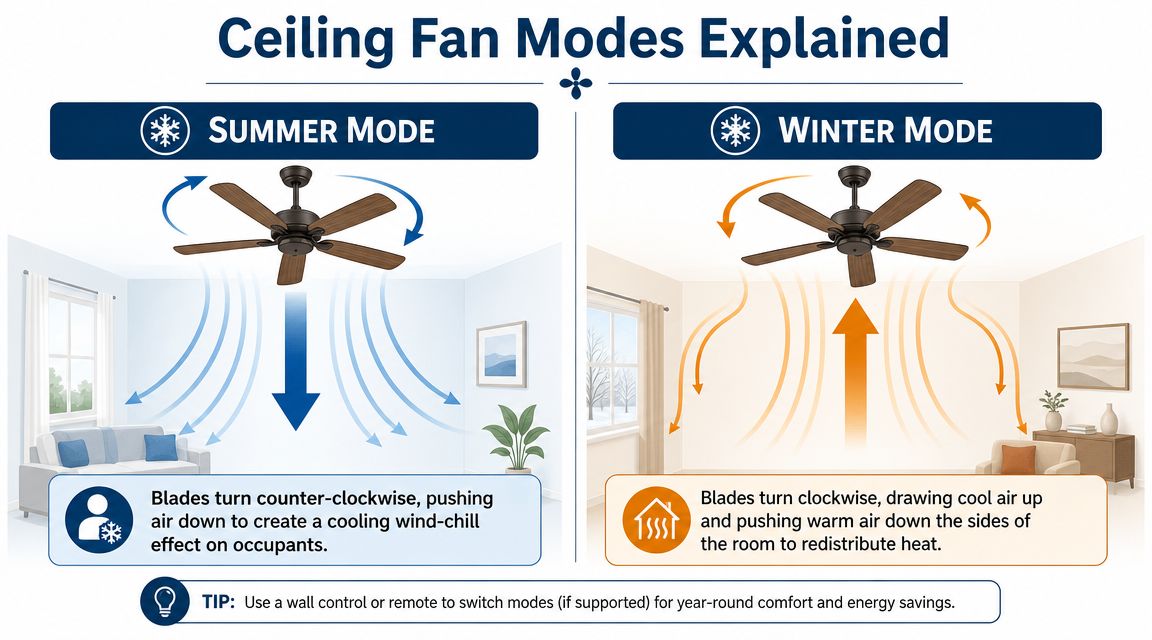
In summer, a ceiling fan should spin counterclockwise so it pushes air downward into the occupied part of the room. That airflow creates a steady breeze across your skin. Hunter's guide to ceiling fan direction explains that this is the standard warm-weather setting.
Why that breeze matters more in Arizona
Arizona's dry heat changes the equation. In a humid climate, sweat does not evaporate as easily, so moving air can feel sticky or limited. In Mesa and across the Phoenix Valley, dry air lets evaporation happen faster. When the fan moves air over your skin, your body sheds heat more effectively. That is why a room can feel cooler even when the thermometer has not changed.
This is the part many generic fan guides miss. The fan is not lowering room temperature. It is improving heat transfer off your body, and that matters a lot in a dry climate.
We see the same misunderstanding on service calls every summer. Homeowners leave fans running in empty rooms and expect lower indoor temperatures by the time they get back. Ceiling fans do not remove heat from the house. Your AC does that. The fan helps comfort where people are sitting, sleeping, or working.
Where the energy savings come from
The savings come from thermostat flexibility, not from the fan acting like a second air conditioner. If the moving air makes a room feel comfortable at a slightly higher thermostat setting, your AC runs less. In Arizona, where cooling costs stack up fast over a long summer, that small adjustment can add up. Our tips for reducing cooling costs during an Arizona summer work best when fan direction is set correctly and used only in occupied rooms.
There is a trade-off. A ceiling fan uses electricity too, so running it in an empty guest room or all day in a home office no one is using wastes power. The smart move is simple. Run the fan where people are present, then shut it off when the room is empty.
Summer mode and winter mode serve different jobs
Summer mode is built for direct comfort. Winter mode is built for gentle air mixing.
| Feature | Summer Mode | Winter Mode |
|---|---|---|
| Blade direction | Counterclockwise | Clockwise |
| Main airflow pattern | Downdraft | Upward pull with gentler redistribution |
| What you feel under the fan | Noticeable breeze | Little direct breeze |
| Best use | Occupied rooms in hot weather | Heat redistribution in cooler weather |
If you stand under the fan and feel a clear breeze, it is doing what summer mode is supposed to do. In Arizona heat, that simple setting can make a room feel better fast and help your AC work a little less hard.
How to Set Your Fan for Summer and Reverse It for Winter
Some fans make this easy. Others hide the switch so well you'd think the manufacturer was playing a joke on you.
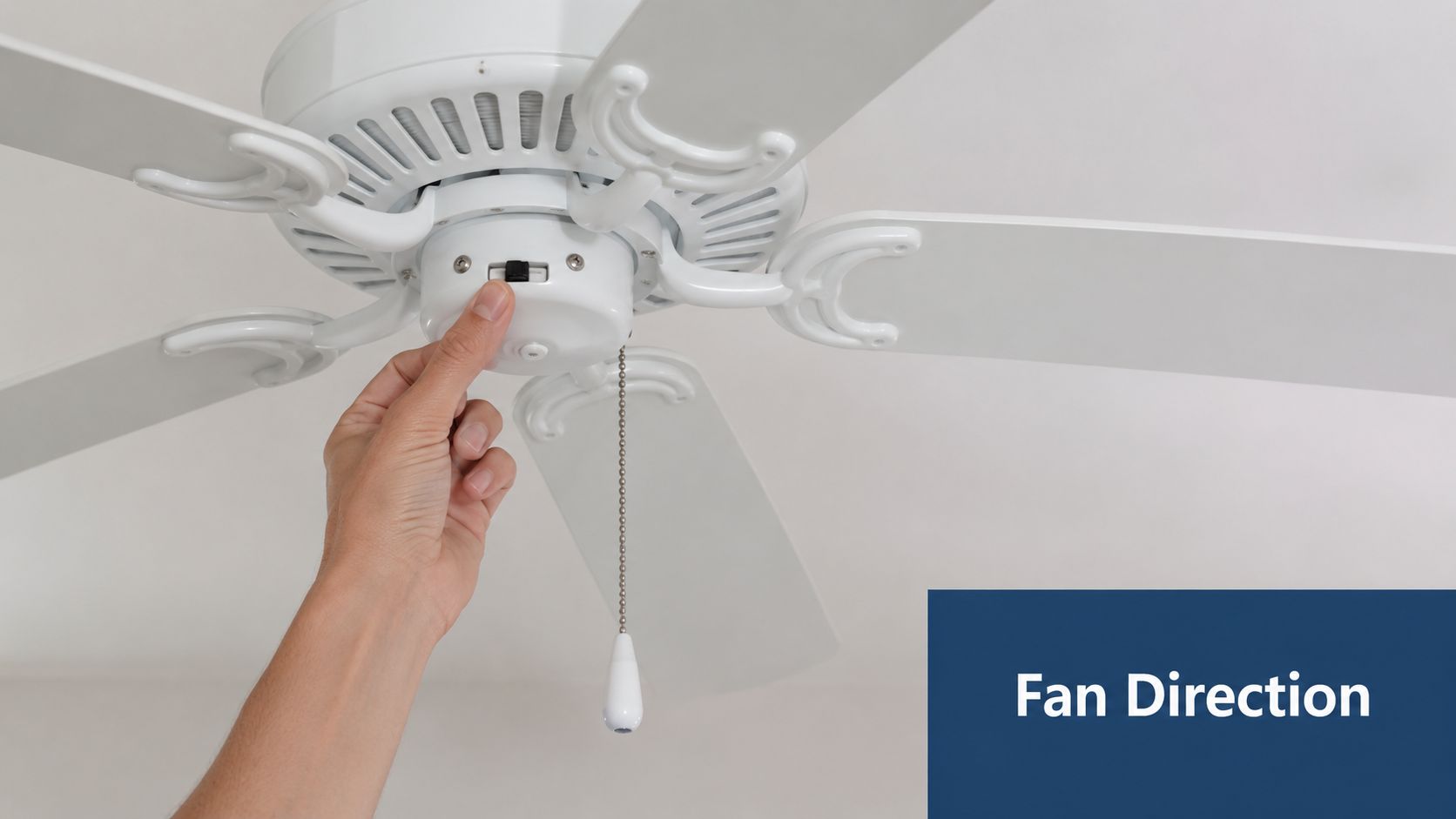
Most standard ceiling fans have a small reverse switch on the motor housing. It's usually just above the blades. On newer models, the reverse function may be built into a wall control or handheld remote instead.
Find the switch before you test anything
Turn the fan off completely first. Let the blades stop. Then check these common control points:
- Motor housing switch. Look for a small slider or toggle on the fan body.
- Remote control reverse button. Some remotes use a circular arrow icon instead of text.
- Wall control panel. Higher-end fans may reverse direction from the wall station.
- Smart app settings. A few integrated fans bury the option in a settings menu.
Labels aren't always helpful. Sometimes they're faded. Sometimes “forward” doesn't mean what a homeowner expects it to mean. That's why blade direction by itself is not always the best final check.
Use the stand-under-it test
This is the easiest way to know you've got ceiling fan summer mode right. Universal Fans notes that while most fans should run counterclockwise in summer, some blade designs can behave differently. Their guidance is simple: if you stand under the fan and feel a cool breeze, the fan is correctly configured for summer. If not, reverse it and test again in their article on which direction a ceiling fan should run in summer.
That test is better than staring at the blades and guessing.
What works best in real rooms
The setting matters, but so does the speed. In occupied rooms during summer, medium or high speed usually gives the most useful comfort effect. Bedrooms, living rooms, and home offices are where people notice this the most because they stay in those spaces long enough to feel the airflow.
A few practical habits help:
- Change the direction seasonally. Don't leave the fan in the same mode year-round.
- Test from the floor, not from the switch. The room's airflow tells you more than the control label does.
- Use higher speed when people are present. Summer relief comes from the breeze you can feel.
- Turn it off in empty rooms. Fans improve occupant comfort. They don't refrigerate the room itself.
You know what? This is one of the few home comfort tricks that takes only a minute and pays off immediately.
Pairing Your Fan with Your AC for Maximum Energy Savings
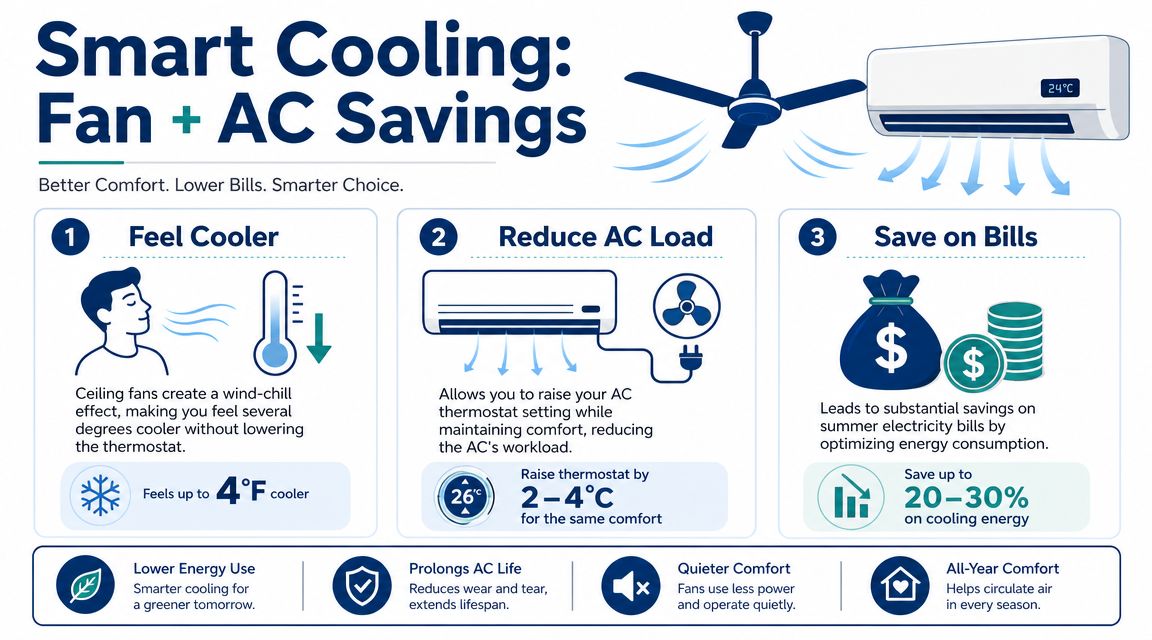
A ceiling fan doesn't replace air conditioning in Arizona. Anyone who's lived through a Mesa summer already knows that. But it can make your AC work smarter because the two systems do different jobs.
The AC removes heat from the indoor air. The fan helps your body feel more comfortable in that cooled space. When homeowners understand that split, they stop expecting the fan to do the wrong job and start using it where it helps.
Why this combo works well in dry heat
Arizona comfort has a different feel than humid climates. In dry conditions, moving air across the skin often feels more effective because evaporation happens readily. That makes ceiling fans especially useful as a comfort multiplier.
The fan won't lower the thermostat reading. It can, however, help people tolerate a less aggressive cooling setting because the air feels better on the skin. That's where the practical savings come from. You're not buying colder air from the fan. You're using airflow to make conditioned air feel more effective.
That's the math that matters locally. Every time the AC can cycle a little less aggressively while the room still feels comfortable, you reduce runtime strain during the hottest part of the season.
What helps and what doesn't
Some pairings deliver results. Others just sound good on paper.
| Strategy | What it does | Worth doing in Arizona |
|---|---|---|
| Fan in occupied room with AC running | Improves perceived comfort where people are present | Yes |
| Fan left on in empty room | Uses electricity without helping anyone feel cooler | No |
| Thermostat slightly higher with active airflow | Maintains comfort more efficiently for many households | Yes |
| Cranking fan up while AC struggles from another issue | Masks discomfort without fixing the cooling problem | Sometimes, but only temporarily |
A common mistake is using the fan to cover up an HVAC issue. If one room never cools properly, airflow can make it feel a bit better, but it won't fix poor duct delivery, a dirty filter, a refrigerant issue, or a unit that's losing capacity in extreme heat.
Build a full heat-control strategy
The best-performing homes stack simple measures together. Ceiling fans help. So does blocking solar gain before it turns into indoor heat. If you're looking at the window side of the problem too, this guide to the best blinds for energy efficiency is a useful complement to fan and AC strategy.
For broader system-side habits, these HVAC energy-saving tips help homeowners tighten up the rest of the cooling picture.
Many Valley homeowners leave money on the table by focusing only on thermostat settings and ignoring airflow, room use, and heat gain. A fan won't solve every summer comfort problem, but when it's set correctly and used in the rooms that matter, it's one of the easiest low-cost upgrades you can make.
Common Issues and Troubleshooting Your Ceiling Fan
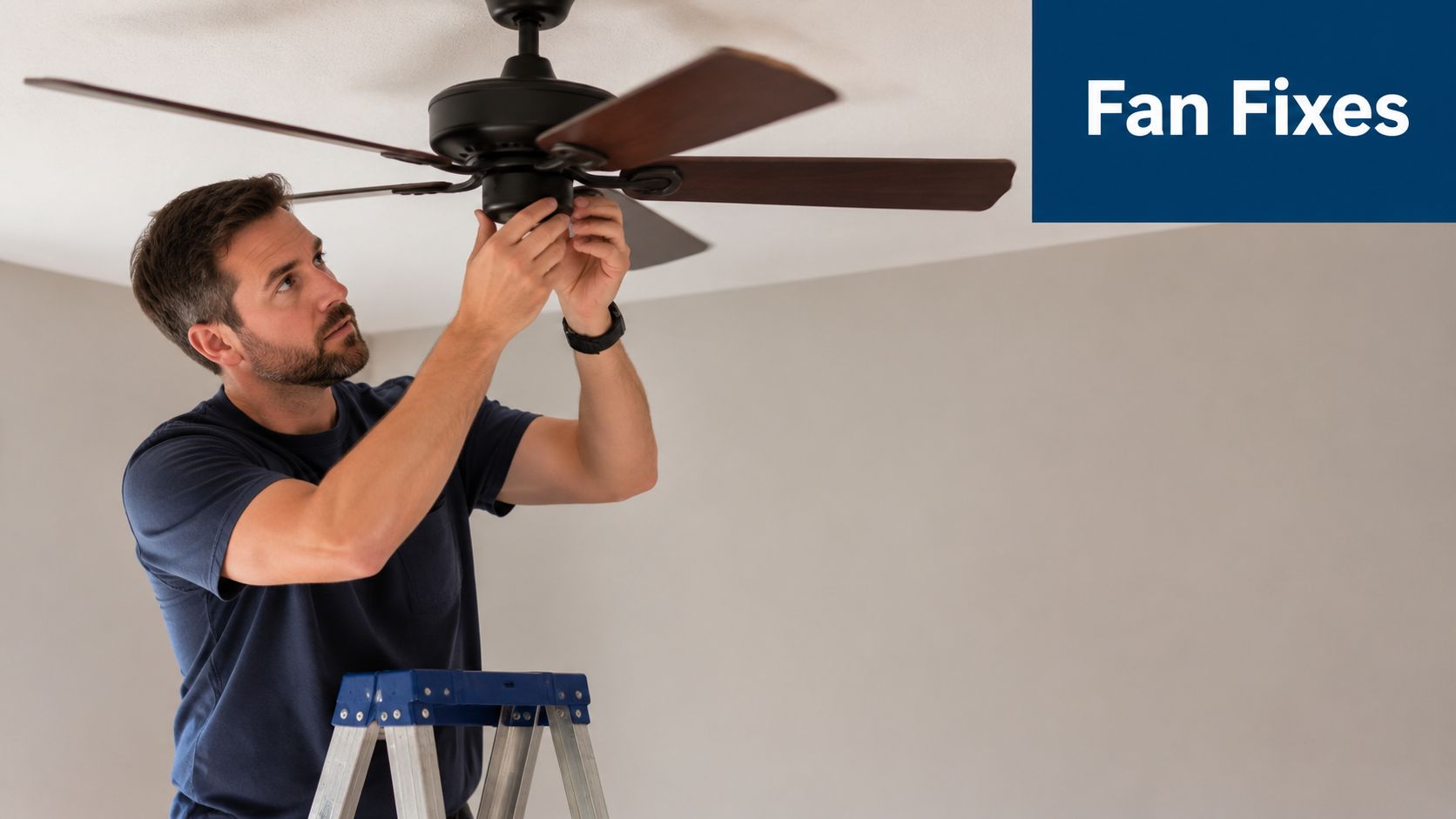
If the fan wobbles, clicks, or hums, don't assume it's done for. Most ceiling fan problems start with something basic and mechanical, not catastrophic.
Start with wobble and blade hardware
Wobble is usually the first complaint. Check the blade screws, the blade arms, and the connection points at the motor. A slightly loose blade can throw off balance enough to make the whole fan shake.
If the hardware is snug and the fan still wobbles, look for blade imbalance. Many fans include a balancing kit. Those little clips and weights can solve a lot of annoying movement if one blade sits just a bit off from the others.
- Loose blade screws. Tighten all blade-to-bracket and bracket-to-motor screws carefully.
- Uneven blades. Check whether one blade sits higher or lower than the rest.
- Mounting movement. If the fan rocks near the ceiling, the issue may be above the decorative cover.
Noise tells you where to look
A clicking sound often points to something lightly tapping during rotation. That could be a blade screw, light kit piece, or trim part that shifted over time. Scraping or grinding is more serious and deserves a closer inspection before you keep using the fan.
A steady electrical hum can be different from normal motor sound. If the fan struggles to start, changes speed unpredictably, or hums loudly, the issue may go beyond basic DIY maintenance.
If the room still feels stuffy after you've confirmed the fan is working properly, the problem may not be the fan at all. In that case, signs can overlap with larger cooling issues, especially if your AC is not blowing air.
Essential Safety and Maintenance Checks
The easiest time to inspect a ceiling fan is when you're already switching it for the season. That creates a habit, and habits catch problems early.
Use a simple seasonal checklist
Start with the blades. Dust buildup adds weight, hurts appearance, and can contribute to imbalance. Wipe each blade with a damp cloth or a fan duster so you're not just pushing dust back into the room.
Then check the hardware by hand.
- Blade attachment. Gently test each blade for looseness where it meets the bracket.
- Motor connections. Look for screws backing out around the blade arms and housing.
- Canopy fit. Make sure the cover at the ceiling sits snug and doesn't shift.
- Overall stability. A little movement can be normal. Excess rocking is not.
Don't ignore mounting and cleanliness
In homes with long cooling seasons, fans collect more dust than people expect. That buildup doesn't just look bad. It can affect balance and send debris into the room the first time you turn the fan on high.
A basic preventive routine keeps the fan quieter, smoother, and safer. If you're already building seasonal habits for your house systems, this HVAC preventive maintenance checklist is a solid companion for the rest of your heating and cooling equipment.
When to Call a Professional for Fan and Cooling Help
Some fan problems cross the line from inconvenience to safety issue. If the fan won't turn on, gives off a strong electrical hum, stops responding to the pull chain or remote, or shows signs of wiring trouble, it's time to bring in a technician. The same goes for a fan that appears fine but the house still won't stay comfortable during extreme heat.
Sometimes the fan isn't the root cause. The bigger issue may be airflow loss, AC performance trouble, or maintenance that the cooling system has missed. If you want a useful read on one neglected area, these tips for maintaining AC coils help explain why coil condition affects cooling performance.
When fan symptoms overlap with larger comfort problems, it helps to compare them against common AC repair concerns near you.
If your fan setup still isn't delivering comfort, or your AC seems to be working harder than it should, Comfort Experts can help you sort out the underlying issue. Call 480-207-1239 or schedule service to get reliable cooling help in Mesa and across the Phoenix Valley.